
General Settings
Input Mode
The Input Mode dropdown at the top left of the General Settings panel controls which physical input device iReporter listens to for button presses.
Three options are available:
When Stream Deck or iReporter Button Box & Stream Deck is selected, an Install Stream Deck Plugin button appears below the dropdown. Clicking it downloads and installs the Stream Deck plugin automatically into the correct plugins folder. If Stream Deck is already running, iReporter will ask whether to restart it now - the plugin files are copied without deleting the existing plugin folder, so Stream Deck does not lose its registration.
Version / Build Number
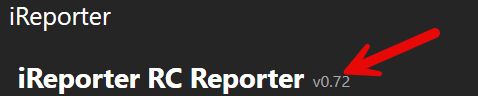
The current version of iReporter is displayed in small grey text next to the iReporter title at the very top of the settings panel (for example, v0.91). This is useful when reporting a problem or checking whether you have the latest release.
If a newer version is available, a highlighted banner will appear below the title bar notifying you of the update and showing both your current version and the version available. You can also check for updates at any time using the Check for Update button in the top row of the settings panel - this will immediately query the update server and prompt you to download and install if a newer version exists.
Connection Status

Directly below the title, iReporter displays a live status bar that shows whether your iReporter Button Box is connected and recognised. The status updates automatically every 2 seconds and uses colour coding to make the state immediately obvious at a glance.
| Colour | Status | What it means |
|---|---|---|
| Green | Verified and Connected | The iReporter Button Box has been found and confirmed as an iReporter device. Everything is working correctly. |
| Amber | Connected - Not Confirmed | A serial device has been detected but has not yet responded as an iReporter Button Box. This can appear briefly during startup while the device is initialising. |
| Red | Not Connected | No iReporter device was found. Check that the Button Box is plugged in via USB, then click Auto Detect to scan all available ports. |
COM Port - Auto Detect
iReporter automatically scans all available COM ports on startup to find your Button Box. It sends a PING command to each port and connects to whichever responds with IREPORTER_READY. The detected port is shown in green in the settings panel and saved for future sessions - the last known port is always tried first for faster reconnection.
If the device is not found automatically (e.g. after changing USB ports), click Auto Detect to trigger a fresh scan at any time.
If you need to connect to a specific COM port manually - for example when using an Arduino-based button box on a known port - type the port number (e.g. 7 or COM7) in the manual field and click Connect.
Number of Buttons
Message Prepend
An optional prefix added to the start of every message before it is sent. This is particularly useful to bring up the text chat box within iRacing. By default "t" is assigned to activating the text chat box and allowing for text entry. It also can be used for tagging messages with a race series name or session identifier, for example: /rc or [SpeedTech Racing]
Enable Logging
When enabled, every button press and the resulting message are written to a dated log file in Documents\iReporter\logs\. One file is created per day, named iReporter_YYYY-MM-DD.txt. Button press events are labelled [Button Press Event] in the log to distinguish them from detection events.
Logging Settings
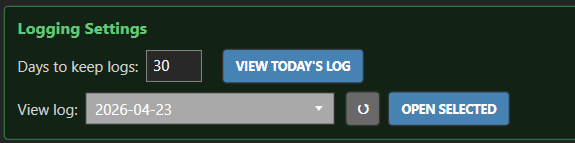
Visible only when Enable Logging is turned on.
- Days to keep logs - iReporter automatically deletes log files older than this many days on startup. Default is 30 days. Valid range is 1-365.
- View Today's Log - opens the current day's log file in Notepad.
- View log - select any past log date from the dropdown and click Open Selected to review it. Use the ? button to refresh the list if new files have appeared.