
iRacing Options
Overview
The iRacing Options section enables features that read live data directly from iRacing. Enable the iRacing Options checkbox to expand the section.
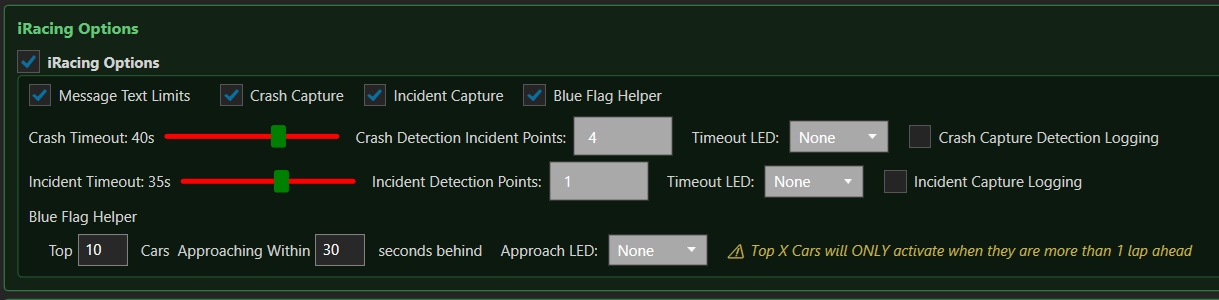
iRacing Message Text Limits
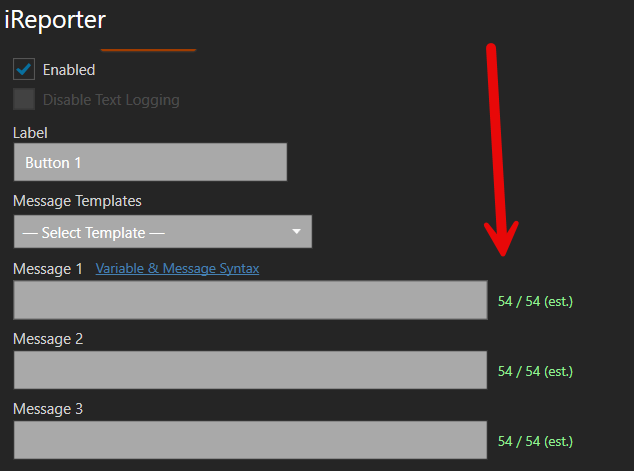
When enabled, message text boxes are limited to the iRacing in-game chat character limit (approximately 60 characters). A character counter is shown beside each message field. This prevents messages from being truncated when typed into the iRacing chat box.
Crash Capture

Monitors all cars on track for sudden increases in incident points. When a car receives incident points at or above the Crash Detection Incident Points threshold, iReporter captures that car's details and makes them available as message variables.
[Crash Capture Detection Event] entry, recording the car number, driver name, direction, and lap. This is separate from button press logging and lets you review every detection regardless of whether a button was pressed.
When a crash is active, buttons that have a Crash Fallback message configured will send that fallback message if the button is pressed and no crash is currently detected.
Incident Capture

Works identically to Crash Capture but for lower-severity incidents. An event is captured as an incident only when the incident point delta meets or exceeds the Incident Detection Points threshold and is strictly below the Crash Detection Incident Points threshold. This ensures that crash-level events are never captured as incidents, and the two detections are always mutually exclusive.
[Incident Capture Detection Event] entry. Crash-level events will never appear here.
Blue Flag Helper

Tracks the top X cars by race position and alerts you when one of them is approaching from behind and is more than one full lap ahead of your position. This helps you anticipate and respond to blue flag situations before they become an issue.
Note: The LED will ONLY activate when the approaching car is more than 1 full lap ahead.ahead. Cars on the same lap as you will never trigger the alert.