# Motorsport Race Receivers

# Introduction

<span style="font-size:11pt;line-height:115%;font-family:'Century Gothic', sans-serif;">Thank you for purchasing your **Speedtech Motorsports Receiver**.  
These instructions are designed to provide **simple, easy-to-follow guidance** for setup and use. Please note that **none of the advanced features is required** for regular operation.</span>

<span style="font-size:11pt;line-height:115%;font-family:'Century Gothic', sans-serif;">Your receiver is a full two-way radio, meaning it can transmit and receive. However, on the **Motorsport channels**, the **transmit function has been disabled** to ensure compliance and prevent accidental transmissions during events.</span>

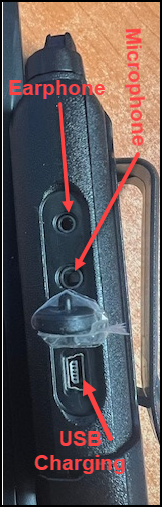
<span style="font-size:11pt;line-height:115%;font-family:'Century Gothic', sans-serif;">Before your event, make sure the radio is **fully charged**. You can charge it in one of two ways. Use the supplied charging cradle or connect a **USB cable** directly to the **USB port** located **below the speaker/microphone socket** on the side of the radio.</span>

**<span style="font-size:11pt;line-height:115%;font-family:'Century Gothic', sans-serif;">Front View</span>**

<table id="bkmrk-front-view-%C2%A0-rear-vi" style="border-collapse:collapse;width:82.8572%;"><colgroup><col style="width:50.0596%;"></col><col style="width:50.0596%;"></col></colgroup><tbody><tr><td>**<span style="font-size:11pt;line-height:115%;font-family:'Century Gothic', sans-serif;">Front View</span>**

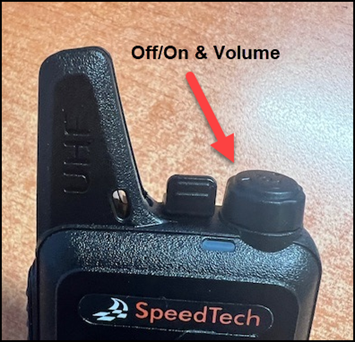
[![image.png](https://books.speedtech.co.nz/uploads/images/gallery/2026-05/scaled-1680-/4RMimage.png)](https://books.speedtech.co.nz/uploads/images/gallery/2026-05/4RMimage.png)

</td><td>**<span style="font-size:11pt;line-height:115%;font-family:'Century Gothic', sans-serif;">Rear View</span>**

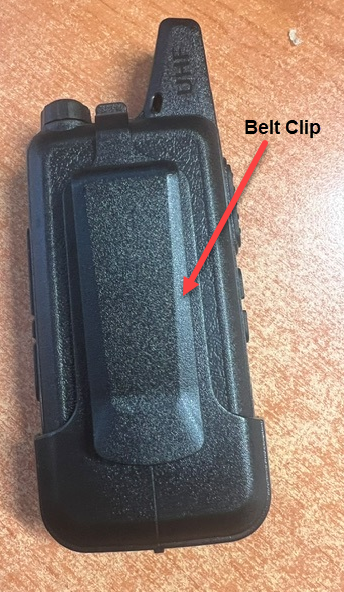
[![image.png](https://books.speedtech.co.nz/uploads/images/gallery/2026-05/scaled-1680-/hU3image.png)](https://books.speedtech.co.nz/uploads/images/gallery/2026-05/hU3image.png)

</td></tr></tbody></table>

**Left View**

<table id="bkmrk-right-view-%C2%A0-left-vi" style="border-collapse:collapse;width:82.381%;height:457px;"><colgroup><col style="width:50.0596%;"></col><col style="width:50.0596%;"></col></colgroup><tbody><tr><td>**Right View**

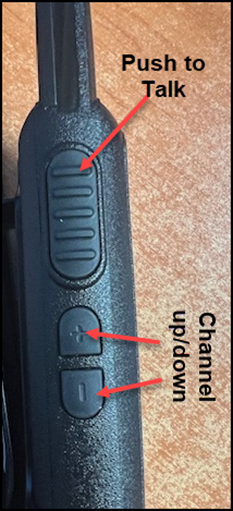
[![image.png](https://books.speedtech.co.nz/uploads/images/gallery/2026-05/scaled-1680-/QNJimage.png)](https://books.speedtech.co.nz/uploads/images/gallery/2026-05/QNJimage.png)

</td><td>**Left View**

[![image.png](https://books.speedtech.co.nz/uploads/images/gallery/2026-05/scaled-1680-/OiTimage.png)](https://books.speedtech.co.nz/uploads/images/gallery/2026-05/OiTimage.png)

</td></tr></tbody></table>

# Channels

<span lang="en-us" style="font-size:11pt;line-height:115%;font-family:'Century Gothic', sans-serif;">Please ensure you select the correct channel for the Motorsport service you wish to receive using the buttons on the side of the radio below the Push to Talk button. When you change the channel, you should also hear the radio announce the channel you have selected. </span>

[![image.png](https://books.speedtech.co.nz/uploads/images/gallery/2026-05/scaled-1680-/eynimage.png)](https://books.speedtech.co.nz/uploads/images/gallery/2026-05/eynimage.png)

#### **<span style="font-family:'Century Gothic', sans-serif;">What is the Public Radio Service (PRS)?  
</span>**<span style="font-size:11pt;line-height:115%;font-family:'Century Gothic', sans-serif;">The Public Radio Service (PRS) is a set of free-to-use UHF channels available throughout New Zealand. These channels are open to anyone and do not require a licence. By selecting a PRS channel, you can communicate directly from radio to radio without needing any additional infrastructure or registration.</span>

# Advanced Radio Functions

<span style="font-size:11pt;line-height:115%;font-family:'Century Gothic', sans-serif;">Your radio includes several advanced features that can be activated using the channel up/down keys. These functions are triggered with a long press, which means holding the button(s) for more than two seconds.</span>

**<u><span style="font-size:11pt;line-height:115%;font-family:'Century Gothic', sans-serif;">Channel Lock</span></u><span style="font-size:11pt;line-height:115%;font-family:'Century Gothic', sans-serif;">  
</span>**<span style="font-size:11pt;line-height:115%;font-family:'Century Gothic', sans-serif;">The **Channel Lock** feature prevents accidental changes to your selected channel.</span>

- - <span style="font-size:10pt;line-height:115%;font-family:'Century Gothic', sans-serif;">To **activate Channel Lock**, press and hold **both the UP and DOWN buttons** together for more than two seconds. (You will hear a single *“beep”*, indicating that the channel lock is active)</span>
    - <span style="font-size:10pt;line-height:115%;font-family:'Century Gothic', sans-serif;">To **deactivate Channel Lock**, repeat the same action. (A double *“beep”* will confirm that the channel is unlocked)</span>

**<u><span style="font-size:11pt;line-height:115%;font-family:'Century Gothic', sans-serif;">Monitor Function</span></u><span style="font-size:11pt;line-height:115%;font-family:'Century Gothic', sans-serif;">  
</span>**<span style="font-size:11pt;line-height:115%;font-family:'Century Gothic', sans-serif;">The **Monitor Function** temporarily disables the **squelch,** a feature that blocks background static or weak signals when no transmission is detected.</span>

- <span style="font-size:10pt;line-height:115%;font-family:'Century Gothic', sans-serif;">To **enable monitoring**, press and hold the **UP (+)** key.</span>
    - <span style="font-size:10pt;line-height:115%;font-family:'Century Gothic', sans-serif;">This will allow you to hear all signals, including weak ones that wouldn’t normally pass the squelch filter.</span>
- <span style="font-size:10pt;line-height:115%;font-family:'Century Gothic', sans-serif;">To **disable monitoring**, release the button.  
      
    </span>
- [![image.png](https://books.speedtech.co.nz/uploads/images/gallery/2026-05/scaled-1680-/XIaimage.png)](https://books.speedtech.co.nz/uploads/images/gallery/2026-05/XIaimage.png)

# Support

**<span lang="en-us" style="font-family:'Century Gothic', sans-serif;">After Sales Support</span><u><span lang="en-us" style="font-size:11pt;line-height:115%;font-family:'Century Gothic', sans-serif;">  
</span></u>**<span lang="en-us" style="font-size:11pt;line-height:115%;font-family:'Century Gothic', sans-serif;">Speedtech offers full support for all products sold, available via email or phone. All Speedtech products are fully certified in New Zealand via Radio Spectrum Management (RSM). </span>

<span lang="en-us" style="font-size:11pt;line-height:115%;font-family:'Century Gothic', sans-serif;">Email: sales@speedtech.co.nz</span>